
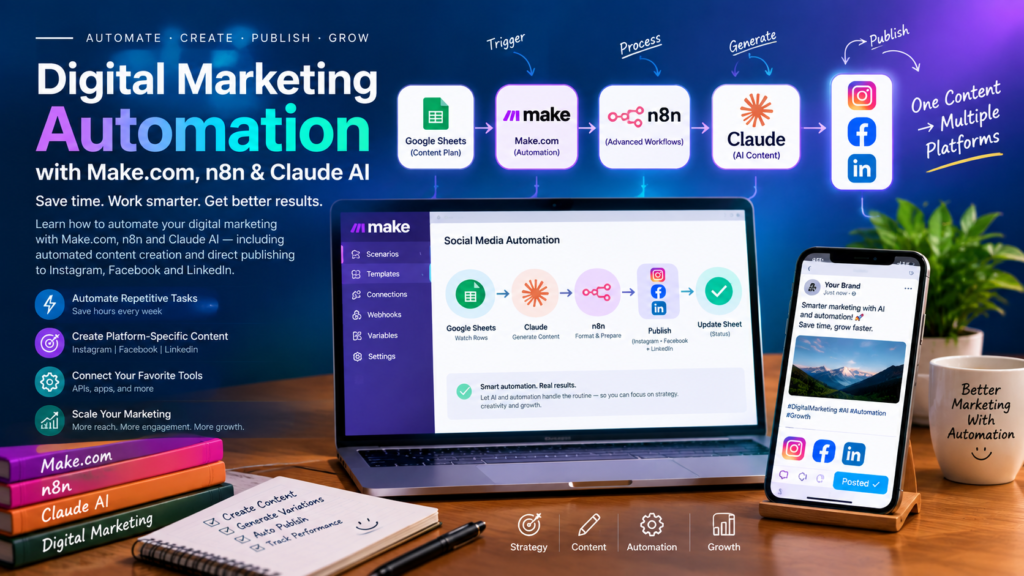
Digital Marketing Automation with Make.com, n8n and Claude AI: The Complete Guide
Digital marketing has become increasingly complex. Businesses need to create content, manage social media, generate leads, respond to customers, publish blogs, analyze campaigns, and maintain a consistent online presence across multiple platforms.
Doing all of this manually can consume hours every week.
This is where digital marketing automation can make a major difference.
With automation platforms such as Make.com and n8n, combined with AI tools such as Claude, businesses and digital marketing agencies can build workflows that connect different tools and perform repetitive marketing tasks automatically.
For example, imagine creating one piece of content and having an automation system prepare different versions for Instagram, Facebook, and LinkedIn, send them for approval, and then publish them automatically.
That type of workflow is possible with modern automation tools and the APIs provided by the relevant platforms. n8n already has workflows demonstrating automated publishing across Instagram, Facebook, and LinkedIn.
What Is Digital Marketing Automation?
Digital marketing automation means using software, workflows, APIs, and AI to perform repetitive marketing activities with minimal manual work.
Instead of doing this:
Write → Copy → Paste → Format → Upload → Publish → Record Results
you can build a workflow such as:
Trigger → AI → Content Processing → Approval → Publish → Track Results
Automation doesn’t mean that every marketing decision should be handed over to AI.
A better approach is to automate repetitive operations while keeping humans involved where strategy, creativity, brand decisions, and approval are important.
What Are Make.com and n8n?
Make.com
Make.com is a visual automation platform that allows you to connect different applications and create automated workflows called scenarios.
A workflow can start with something such as:
- A new Google Sheets row
- A new form submission
- A new email
- A scheduled time
- A new WordPress article
- A webhook
- A new CRM lead
The workflow can then perform multiple actions across different applications.
Make also supports AI workflows and can connect AI providers such as Anthropic Claude to automated scenarios.
n8n
n8n is another workflow automation platform that is particularly useful for building flexible and highly customizable automation systems.
It can connect services, APIs, databases, AI models, spreadsheets, websites, CRMs, communication platforms, and social media systems.
n8n currently provides many examples for social media automation, including workflows that publish content to Instagram, Facebook, and LinkedIn.
For digital marketing agencies, both Make.com and n8n can be useful.
The right choice depends on the workflow, technical requirements, integrations, budget, hosting preferences, and how much customization is required.
What Role Can Claude AI Play in Digital Marketing Automation?
Claude can act as the AI content and analysis layer inside an automation workflow.
For example, your automation could provide Claude with:
Topic → Target audience → Brand voice → Platform → Objective
Claude can then help generate:
- Social media captions
- Blog outlines
- Blog drafts
- Ad copy variations
- Email content
- Video hooks
- Calls to action
- Content ideas
- Content summaries
- Platform-specific versions
- Marketing analysis
The automation platform then takes Claude’s output and sends it to the next step.
For example:
Google Sheets → Claude → Instagram → Facebook → LinkedIn
This creates a repeatable content distribution system.
Can You Automatically Post to Instagram, Facebook and LinkedIn?
Yes, workflows can be built to publish content to multiple platforms.
For example, an n8n workflow can use a content calendar in Google Sheets as the control center. When a post becomes due, the workflow can prepare the content and publish it to Instagram, Facebook, and LinkedIn, then update the spreadsheet with the posting status.
The exact capabilities depend on the account type, permissions, APIs, and the type of content being published.
For example, Instagram automation generally requires the appropriate professional/business setup and Meta API permissions.
LinkedIn also provides APIs for creating posts, including organic posts for supported accounts.
Example: One Content → Instagram + Facebook + LinkedIn
This is one of the most useful automations for a digital marketing agency.
Imagine you have a Google Sheet containing:
| Date | Topic | Image | Status |
|---|---|---|---|
| September 25 | AI Marketing Tips | Image URL | Pending |
The automation can work like this:
Step 1: Content Calendar
You add the topic to Google Sheets.
Topic:
“5 Ways AI Can Save Time in Digital Marketing”
Step 2: Automation Trigger
Make.com or n8n detects the new row or scheduled posting time.
Step 3: Claude Creates Content
Claude receives instructions such as:
Create separate social media posts for Instagram, Facebook and LinkedIn based on this topic. Keep the tone professional and adapt the format for each platform.
Instead of simply copying the same caption everywhere, the automation can create platform-specific versions.
Step 4: Content Review
The workflow can send the generated content to you through email, Telegram, Slack, or another approval system.
You can choose:
Approve
or
Reject / Edit
This human approval step is especially useful for agency work.
Step 5: Publish
After approval, the workflow sends the content to the appropriate platform.
For example:
Instagram → Publish
Facebook Page → Publish
LinkedIn Page/Profile → Publish
Step 6: Update the Content Calendar
The workflow updates Google Sheets:
Status: Published
It can also save:
- Publication date
- Platform
- Post URL
- Post ID
- Error message
- Campaign name
Now you have a complete content publishing system.
Digital Marketing Automations You Can Build
Social media publishing is only one use case.
A digital marketing agency can build many different automation workflows.
1. Social Media Content Automation
You can automate:
- Content ideas
- Captions
- Hashtags
- Platform-specific copy
- Content calendars
- Image generation
- Approval
- Publishing
- Post tracking
A workflow could look like:
Google Sheets → Claude → Approval → Instagram + Facebook + LinkedIn
2. Blog-to-Social Media Automation
Suppose you publish a new WordPress article.
Instead of manually creating social posts, an automation can detect the new article and create social content automatically.
Workflow:
WordPress → Claude → Instagram Caption + Facebook Post + LinkedIn Post → Approval → Publish
There are already n8n workflows designed around automatically converting WordPress content into social posts for multiple platforms.
3. Lead Generation Automation
Lead generation can also be automated.
For example:
Website Form → Google Sheets/CRM → Claude → Lead Qualification → Email → Sales Notification
When someone submits a form, the automation can:
- Capture the lead.
- Save the information.
- Categorize the lead.
- Summarize the customer’s requirements.
- Notify the sales team.
- Send an appropriate follow-up email.
This can reduce the amount of repetitive administrative work.
4. Email Marketing Automation
You can connect forms, CRM systems, email platforms, and AI.
Example:
New Lead → Claude → Personalized Email → Email Platform → CRM Update
Claude can help prepare the email content while the automation platform handles the movement of information between systems.
5. Content Calendar Automation
A Google Sheet can become the central control panel for your social media system.
For example:
| Date | Topic | Status | |||
|---|---|---|---|---|---|
| 25 Sep | AI Marketing | YES | YES | YES | Pending |
| 26 Sep | SEO Tips | YES | YES | NO | Pending |
| 27 Sep | Ad Tips | YES | YES | YES | Pending |
n8n workflows can use platform flags to determine where content should be published.
This gives a marketing agency a simple way to control its automated publishing system.
6. Customer Review Automation
You can create workflows that collect customer reviews and organize them automatically.
For example:
New Review → Claude → Sentiment/Category → Google Sheets → Notification
The system can classify reviews into categories such as:
- Positive
- Neutral
- Negative
- Product feedback
- Service feedback
Negative reviews can be routed to a human for attention instead of automatically generating a public response.
7. Marketing Report Automation
Reporting is another excellent automation opportunity.
A workflow can collect verified data from marketing platforms and organize it into a report.
For example:
Marketing Data → Google Sheets → Analysis → Claude → Report → Email
Claude can help turn the data into an understandable summary.
A report could explain:
- What happened?
- Which campaigns performed well?
- Which campaigns need attention?
- What changed from the previous period?
- What should be investigated next?
The actual performance metrics should come from the relevant platforms rather than being invented by AI.
8. Ad Copy Automation
You can build an AI-assisted workflow for advertising campaigns.
For example:
Product Information → Claude → Multiple Ad Copy Variations → Human Approval → Ads Platform
Claude can generate different messaging angles for testing.
For example:
- Problem-focused
- Benefit-focused
- Educational
- Offer-focused
- Social-proof-focused
The marketing team can then select and test the appropriate variations.
9. Website Content Automation
You can connect your website or WordPress system to an AI-assisted workflow.
For example:
Topic → Claude → Blog Draft → Human Review → WordPress → Social Media
This creates a complete content distribution pipeline.
One article can become:
1 Blog
↓
1 LinkedIn Post
↓
1 Facebook Post
↓
1 Instagram Caption
↓
Several Short Content Ideas
This is where automation becomes especially valuable for content marketing.
10. Client Onboarding Automation
Digital marketing agencies can also automate their onboarding process.
For example:
New Client Form → Google Sheets/CRM → Welcome Email → Folder Creation → Internal Notification → Task Creation
When a client submits their information, the system can automatically organize the information and notify the appropriate team members.
Make.com vs n8n for Digital Marketing Automation
Both platforms can be used to build powerful workflows, but they have different strengths.
Make.com
Make.com is useful when you want a visual interface and relatively straightforward connections between applications.
It can be a good option for marketers who want to build workflows without spending all their time on technical configuration.
n8n
n8n is particularly useful when you want more control and customization.
It can be valuable for agencies building more complex systems involving:
- APIs
- HTTP requests
- Databases
- AI workflows
- Custom logic
- Webhooks
- Multi-step automations
n8n also has a large collection of community workflow templates for marketing automation.
Where Does Claude Fit?
Think of the system as three layers.
Layer 1: AI
Claude
Claude can help with:
- Writing
- Rewriting
- Analysis
- Ideas
- Summarization
- Content adaptation
Layer 2: Automation
Make.com or n8n
The automation platform handles:
- Triggers
- Conditions
- Data movement
- API calls
- Scheduling
- Routing
- Notifications
- Publishing
Layer 3: Marketing Platforms
These can include:
- WordPress
- Google Sheets
- Gmail
- CRM
- Advertising platforms
- Cloud storage
Together, these layers can create an AI-powered marketing workflow.
Important: Claude Pro vs Claude API
If you already have Claude Pro, you can use Claude directly for your own marketing work, writing, research, and content creation.
However, there is an important distinction when building automation.
Anthropic states that the Claude Pro subscription does not include API usage through the Anthropic Console. API access is a separate service with separate usage billing.
Therefore, if you want a Make.com or n8n workflow to automatically call Claude without you manually opening Claude each time, you should plan for an Anthropic API connection and its associated usage costs.
This is different from simply having Claude Pro open in your browser.
A Complete AI Social Media Automation System
For a digital marketing agency, a more advanced system could look like this:
Content Idea
↓
Google Sheets / Airtable
↓
Make.com or n8n
↓
Claude AI
↓
Platform-Specific Content
↓
Image/Video
↓
Human Approval
↓
↓
Post URLs + Status
↓
Google Sheets / Database
↓
Performance Reporting
This can become a reusable system for your own agency and potentially for client projects.
Should You Automate Everything?
Not necessarily.
The goal should not be:
“AI does everything.”
A better goal is:
“Automate repetitive work and keep humans in control of important decisions.”
For example, you can automate:
- Formatting
- Repetitive data entry
- Content distribution
- Notifications
- Reporting preparation
- Content repurposing
- Scheduling
But you may want human approval for:
- Important client communications
- Paid advertising changes
- Sensitive claims
- Brand messaging
- Negative customer responses
- Major campaign decisions
This creates a safer and more professional agency workflow.
The Future of Digital Marketing Automation
Digital marketing is moving toward systems where AI and automation work together.
Instead of having separate tools for every task, agencies can connect their marketing stack into automated workflows.
A single piece of content can become multiple platform-specific assets.
A website lead can automatically enter a CRM.
A new blog can automatically become social media content.
Marketing data can automatically be organized into reports.
And repetitive tasks can run in the background while marketers focus on strategy and creative decisions.
Make.com and n8n provide the automation layer, while AI models such as Claude can provide the intelligence required for content and analysis.
Final Thoughts
Digital marketing automation can help agencies reduce repetitive work, improve consistency, and build scalable marketing processes.
With Make.com or n8n + Claude + social media APIs + tools such as Google Sheets and WordPress, it is possible to build workflows that connect content creation, approval, publishing, lead management, reporting, and other marketing activities.
One of the most useful systems for a digital marketing agency is a multi-platform content automation workflow:
Create Once → AI Adapts → Approve → Publish to Instagram + Facebook + LinkedIn → Track Results
The key is not to automate marketing blindly. The real value comes from designing intelligent workflows where AI handles repetitive tasks, automation moves information between systems, and marketers remain in control of strategy and final decisions.
If you’re building an AI-powered digital marketing agency, learning Make.com, n8n, API integrations, and AI-assisted workflows can give you the foundation for creating powerful marketing automation systems.